How to Fix VSS
Situation
A backup plan failed with one of the following error codes: 2405, 2422, 2415, 2416, 2417, 2418, 2419, 2401, 2402, 2404, 2407, 2409, 2410, 2425, 2412, 2411.
Managed Backup
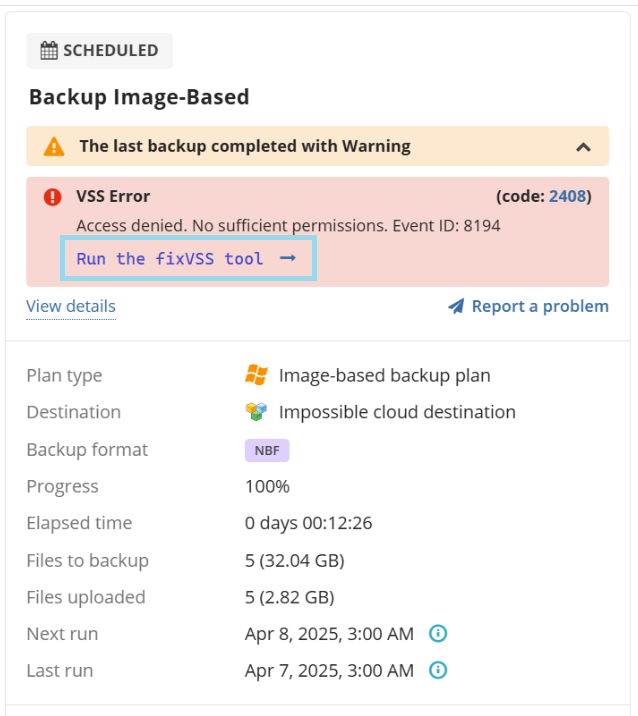
Standalone Backup
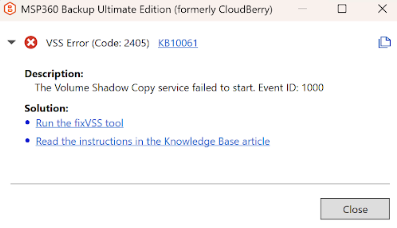
Cause
These errors occur when there are issues with the Volume Shadow Copy Service (VSS) in Windows.
Solution
Run the fixVSS tool to automatically resolve VSS-related problems, using one of the following approaches:
Pressing the Run the fixVSS tool link right in the error/warning message;
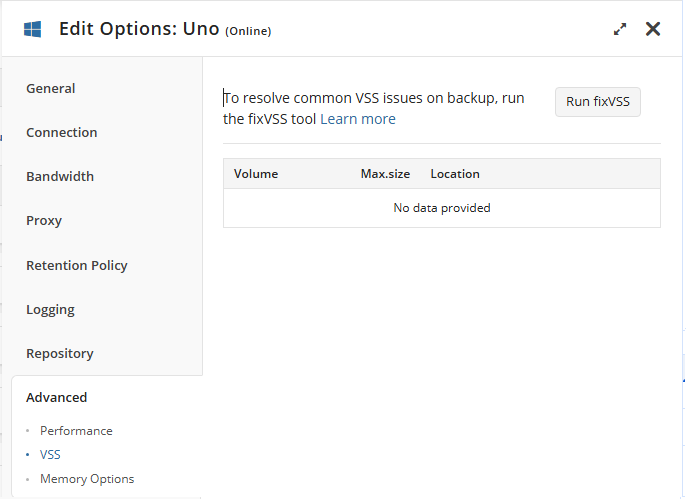
Pressing the Run fixVSS button on the Management Console's Computers page > Edit Options for the affected machine > Advanced menu -> VSS sub-menu:
- Executing the following commands in the affected machine's elevated CMD (command line) interface:
cd "C:\Program Files\YOUR_COMPANY_NAME\Online Backup"
cbb.exe fixVSS
Note the customizable path elements in the above cd command that might be applicable in your situation: customized company name and custom-branded Backup Agent software name (Product name).
FixVSS tool: How it works
- Stopping Services
- Stops the Volume Shadow Copy (VSS) service
- Stops the Microsoft Software Shadow Copy Provider (swprv) service
- Re-registering Critical DLLs that VSS relies on:
- Registers the core OLE (Object Linking and Embedding) components.
- Registers OLE Automation support.
- Registers the VSS Proxy Stub DLL.
- Attempts to re-register the VSS service (though this is not a standard Windows command; it may be a script).
- Reinstalls the Software Shadow Copy Provider DLL.
- Registers the Event Class DLL.
- Registers the Event System DLL.
- Registers the Standard WMI Provider.
- Registers the VSS UI component.
- Registers different versions of MSXML (used for XML processing).
- Fixing OLE permissions to prevent the "Unexpected error querying for the IVssWriterCallback interface" error.
- Re-registering VSS Service and Restarting Services
- Performs another attempt to register VSS (if the first one failed).
- Starts the swprv service.
- Starts the VSS service.