NTFS Permission Backup and Restore
This article describes NTFS permission backup and restore for the new backup format.
Backup
The NTFS permissions backup includes:
- Discretionary Access Control List - list of ACEs: Principal (SID), Type (Allow/Deny), Access (Read, Write, FullControl, etc.) for each ACE
- Inheritance flags
Only explicitly assigned permissions and the inheritance flag are included in the backup.
Backup Agent
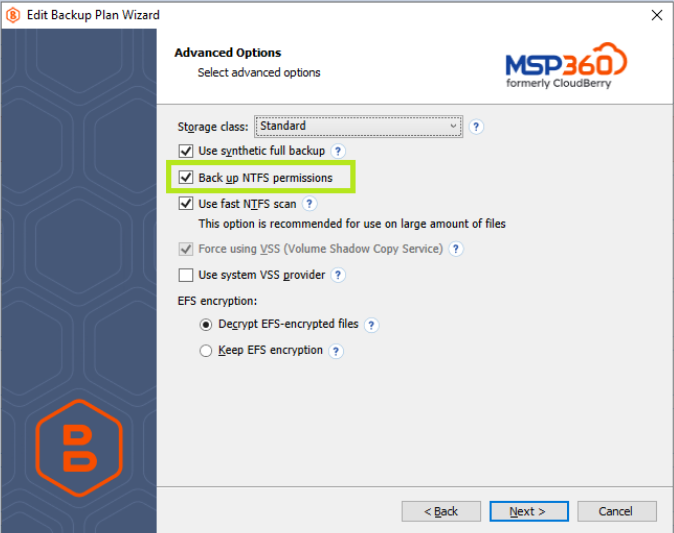
By default, NTFS permission backup is disabled. Enable the Back up NTFS permissions option on the Advanced Options step to preserve security information.
Management Console
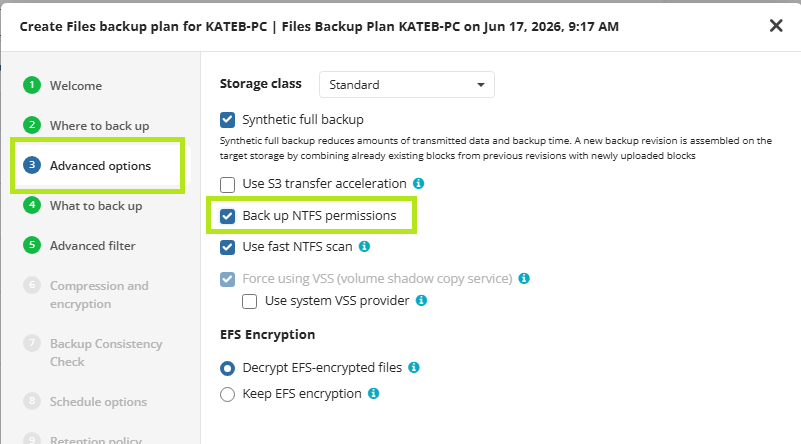
By default, NTFS permission backup is disabled. Enable the Advanced Options step, and then select the Back up NTFS permissions option.
Backup Behavior and Limitations
Permission-only changes
Changing permissions alone does not trigger a re-backup. If an object’s permissions change but the object itself remains unchanged, it will not be backed up again.
However, because the backup includes the entire path to an object, a folder with changed permissions may still be included in a future backup if any file inside that folder changes.
In that case, the folder permissions are captured in the new backup.
Ownership backup and restore limitations
Currently, backing up and restoring object ownership is not fully supported. This support is a planned improvement.
Consider the following:
- If the Backup service runs under the Local System Account, restored folders will be owned by
SYSTEM. When restoring to a Net Share, restored folders will be owned by the Net Share user specified during restore. - If the Backup service runs under a local administrator account, restored folders will be owned by the
Administratorsgroup. When restoring to a Net Share, restored folders will be owned by the Net Share user specified during restore.
Restore
Restoring NTFS permissions may require administrative privileges. Refer to the Restore Requirements and Behavior section below for more details.
- Restoring to an NTFS volume (permissions are not preserved on FAT32, exFAT, or many cloud storage targets)
NTFS permissions reference SIDs, not usernames.
If a user account cannot be resolved in the target environment, the permission entry may appear as a SID instead of a username.
Backup Agent
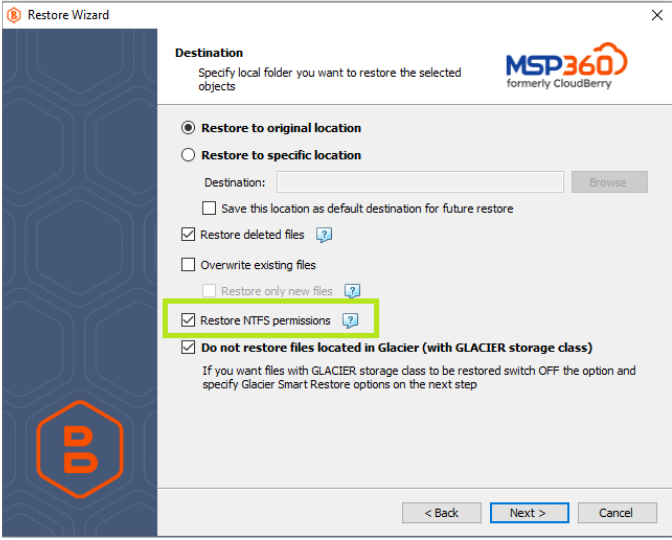
By default, NTFS permission restore is disabled. Enable the Restore NTFS permissions option on the Destination step to restore security information.
Management Console in Managed Backup
By default, NTFS permission restore is disabled. Enable the Restore NTFS permissions option on the Destination step to restore security information.
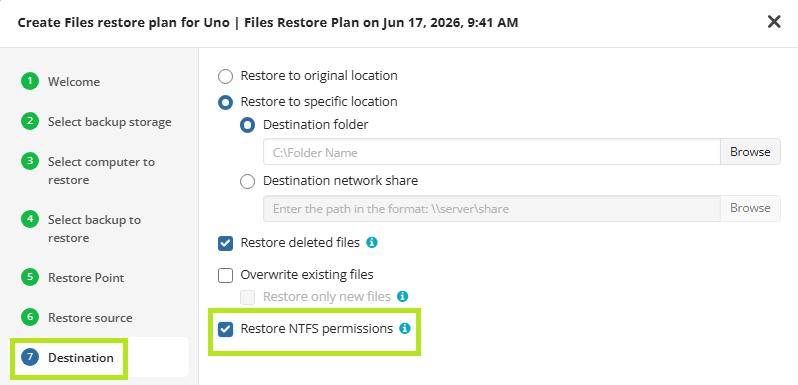
Restore Requirements and Behavior
Restore to a local machine:
The user account under which Backup Agent is running must have sufficient permissions to assign NTFS permissions to folders. The account must either belong to the Administrators group or have Full Control permissions for the target folder and all nested folders.
Restore to a Net Share:
The user account specified for accessing the Net Share must have sufficient permissions to assign NTFS permissions to folders. This account must have Full Control permissions for the target folder and all nested folders.
Restore is not tied to the original backup user:
Restoring data from a backup containing NTFS permissions does not depend on the Windows user who created the backup. The restore operation can be performed by a different user, as long as that user has sufficient permissions.
Restore between standalone local machines:
NTFS permissions are restored using user SIDs (Security Identifiers). Restoring permissions from one standalone local machine to another is technically possible, but not very effective. In such cases, only the SIDs are restored, and they typically appear as unknown accounts in Windows security settings.
Restore between domain-joined machines:
Because NTFS permissions are restored using SIDs, restoring permissions from one domain-joined machine to another works correctly, provided that all assigned accounts are domain accounts available in the target environment.
Ownership when Backup service runs as Local System Account:
If the Backup service runs under the Local System Account, restored folders will be owned by SYSTEM.
When restoring to a Net Share, restored folders will instead be owned by the Net Share user specified during restore.Ownership when Backup service runs as a local administrator:
If the Backup service runs under a local administrator account, restored folders will be owned by the Administrators group.
When restoring to a Net Share, restored folders will instead be owned by the Net Share user specified during restore.
Object-level restore
Permissions (including the inheritance flag) are restored only for objects created during the restore process.
When the Override Existing option is enabled, an existing file is overwritten together with its permissions.
However, folders that already existed before restore are not affected. Their permissions remain unchanged.
Restore scope
Permissions are restored only from the level of the selected restore item. Refer to the examples below for details.
Volume restore
Volume permissions are backed up.
However, they are not restored when restoring to the original location.
They are restored only when:
- restoring to a non-original location, and
- the restore target is the volume itself
Examples
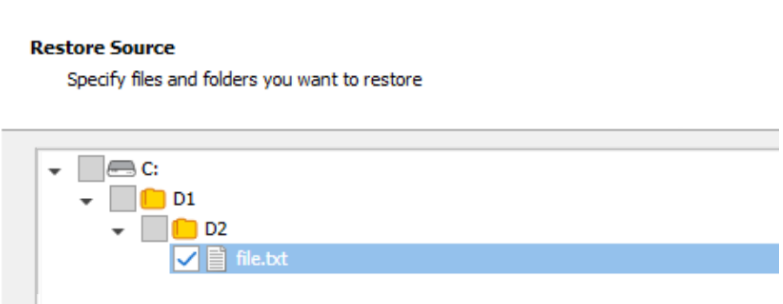
During restore, the hierarchy level of the selected item (volume, folder, subfolder, or file) is important. Permissions will be restored only from that level downward.
Example 1: Restore from folder D1 or volume root
If the restore checkbox is selected on folder D1 or on the volume root, all backed-up permissions will be restored for:
- folder D1
- folder D2
- the file
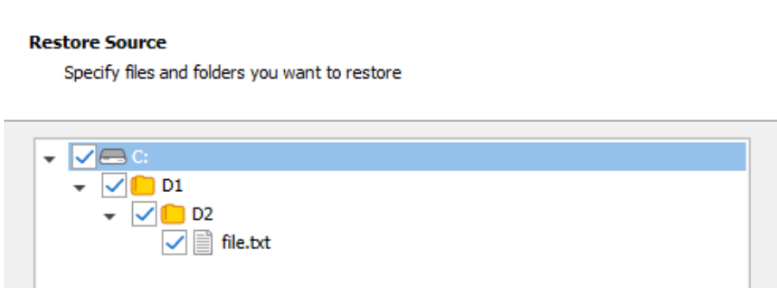
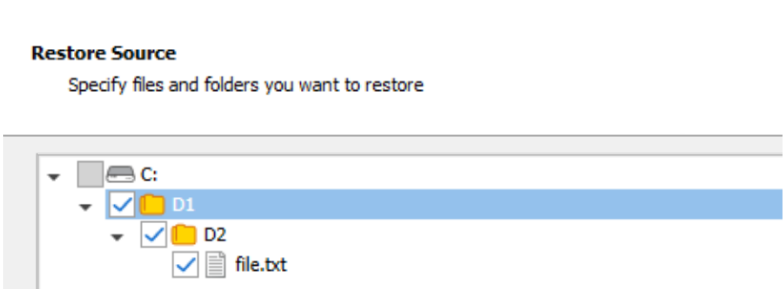
This means permissions are restored for the selected item and all child objects below it.
Permissions for C:\ will not be restored when restoring to the original location.
Example 2: Restore from folder D2
If the restore checkbox is selected on folder D2, permissions will be restored for:
folder D2
the file
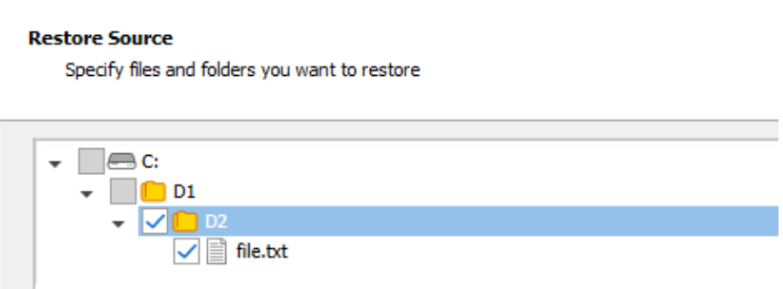
Folder D1 will be created if it does not already exist in the destination location.
However, explicit permissions stored in the backup for D1 will not be restored.
Example 3: Restore the file
If the restore checkbox is selected on the file, permissions will be restored only for that file.
Folders D1 and D2 will be created if they do not already exist in the destination location.
However, explicit permissions stored in the backup for D1 and D2 will not be restored.