Cannot Delete Data Using Azure Lifecycles
Situation
When setting up Azure Active Directory credentials to delete backup data in Azure storage using the lifecycle policy, the following warning occurs: The selected Azure AD tenant with the selected subscription is not granted with data management permissions in the %azure_accnt% storage account. Select another Azure AD tenant and/or subscription
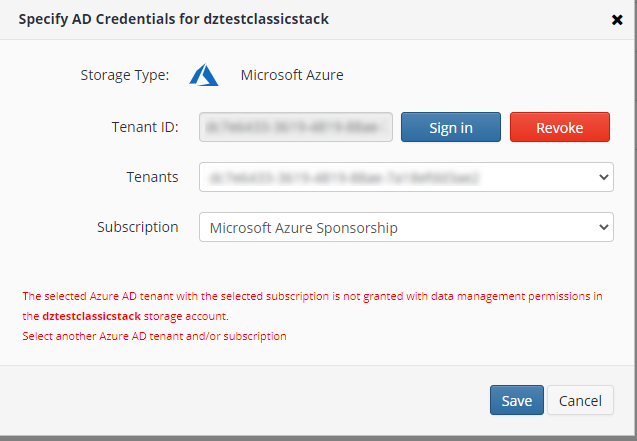
Cause
There are two possible causes for this warning to occur:
- The storage account type does not support lifecycle management
- The selected tenant and subscription do not support data management
Solution
Check whether lifecycle management is supported for your current Azure storage account type. The following storage account types support lifecycle management:
- Standard general-purpose v2
- Premium block blobs
In this case, you can upgrade your storage account type to the Standard general-purpose V2, for example. To learn how to do this, refer to the Upgrade to a general-purpose v2 storage account chapter at docs.microsoft.com.
If your storage account supports lifecycle management (Standard general-purpose V2 or Premium block blobs) and the warning still occurs, try to select another tenant and subscription.
If nothing helps, you can delete the backup data manually in the Azure console.