Hyper-V Instance Backup Fails due to Inability to Remove Temporary Checkpoint
Situation
In rare cases, a specific Hyper-V instance may fail to be backed up due to the accumulation of invalid temporary checkpoints that cannot be deleted.
The following error could be reported for a failing backup plan:
WMI Error (Code 1914) WMI job failed Reason Job Failed: "Error Code: '32779'
This error appears alongside diagnostic log records for the failing plan, similar to the ones below:
2024-05-05 12:48:40,000 [VM] [1] INFO - Deleting old checkpoints with name:'CBB temporary snapshot for plan "plan number"' 2024-05-05 12:48:41,000 [VM] [1] INFO - Removing virtual machine checkpoint: 'CBB temporary snapshot for plan "plan number"' 2024-05-05 12:48:42,000 [VM] [1] ERROR - Job failed : ''. Error code: '32779'. 2024-05-05 12:48:43,000 [SERV] [1] ERROR - Error occurred on virtual machine backup: [INSTANCE_NAME]
If the Hyper-V instance with a problematic backup, when observed in Hyper-V Manager, has the following properties:
- A tree of old (relative to the backup date) temporary checkpoints that cannot be manually deleted due to the absence of the corresponding AVHD or AVHDX files (a reference example is shown below):
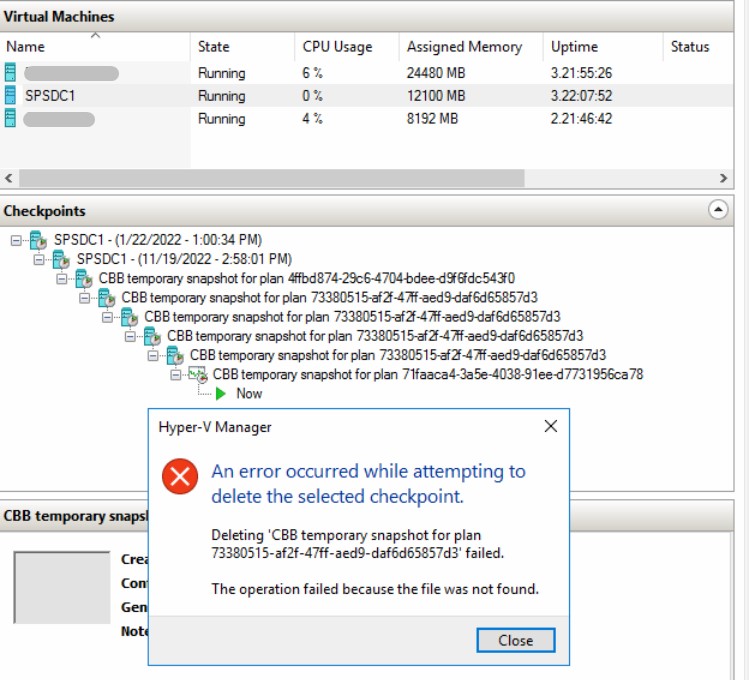
No redundant AVHD or AVHDX files with creation/modification dates corresponding to the aforementioned old temporary checkpoints.
Persistence of the issue after a maintenance reboot of the Hyper-V host server.
Then the solution below should be considered.
Solution
If manual removal of broken temporary checkpoints cannot be performed, manual sequential merging of all AVHD (or AVHDX) files of the problematic Hyper-V instance is required to properly address and resolve the issue.