Unable to Back up Locked VM (code 1970)
Situation
A backup plan completes with the following warning message: Unable to back up locked VM. Proxmox places a lock on a VM during operations such as backup, snapshot creation, migration, or cloning. If a previous operation crashed or timed out, the lock may remain and prevent new backup jobs from starting. The message also contains a list of the locked VMs.
Cause
The locked VMs cannot be backed up.
The system locks a VM configuration to prevent data corruption during critical tasks. If a task crashes or is manually stopped, the "lock" flag might remain in the config file, preventing you from starting or modifying the VM. Running qm unlock manually clears this flag.
The backup service performs multiple retry attempts for up to 5 minutes, but the listed VMs remain locked during this time and are skipped.
Solutions
- Wait for the operation to complete. If a legitimate operation is still running, allow it to finish. You can verify running tasks in the Proxmox Web Console under Datacenter > Tasks.
- Unlock manually: If no operation is currently running, you can remove the lock manually using the following command:
qm unlock <Proxmox_VM_ID>
Where '<Proxmox_VM_ID>' stands for the Proxmox VM ID.
Do not unlock the VM while an operation is in progress, as this may corrupt the disk or snapshot state.
Troubleshooting Checklist
Before unlocking a VM manually, verify the following:
1. Check for stuck backup jobs
- Ensure that no previous backup process is still running or hanging.
2. Verify cluster tasks (if using a cluster)
- Make sure the operation is not running on another node in the cluster.
3. Check running tasks
- Open the Proxmox Web Console, log in to your account (e.g., https://proxmox-ve or the required IP address), and navigate to Datacenter -> Tasks.
- Confirm that no backup, snapshot, migration, or clone operation is currently running for the VM.
4. Check VM lock status
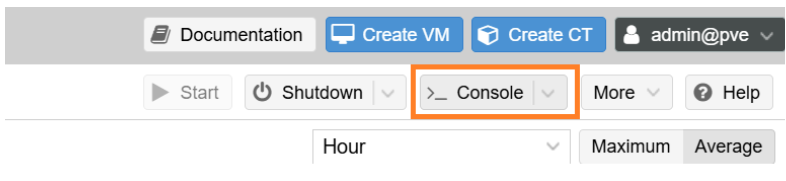
- Open the Node Console. In the resource tree on the left, select the Node where the VM is located (not the VM itself) and click the >_ Console (or Shell) button in the top right menu to open the terminal.
- Run the following command on the Proxmox node to verify if the VM is locked:
qm config <Proxmox_VM_ID>
Look for the lock: parameter in the output.
5. Unlock the VM only if safe
- If no operation is running and the VM remains locked, unlock it manually:
How to Unlock a Locked Virtual Machine in Proxmox
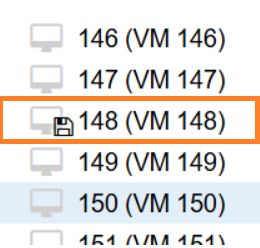
If a Virtual Machine (VM) in Proxmox is marked with a lock icon (often caused by an interrupted backup, migration, or snapshot), follow the steps below to restore control.
1. Access the Proxmox Web Console
- Log in to your Proxmox web interface (e.g., proxmox-ve).
2. Open the Node Console
- In the resource tree on the left, select the Node where the VM is located (not the VM itself) and click the >_ Console (or Shell) button in the top right menu to open the terminal.
3. Run the Unlock Command
- In the terminal window that appears, type the following command using the specific VM ID (e.g., 148):
qm unlock 148
Only run this command if you are certain that no active background processes (like a backup) are currently running for that VM.