VSS timeout exceeded (Code 2426)
Situation
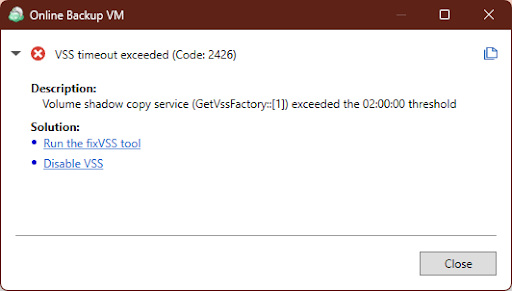
A backup plan failed with the following error message: Error code 2426. VSS timeout exceeded. Volume Shadow Copy service (GetVssFactory:[1]) exceeded the 02:00:00 threshold.
Cause
A VSS timeout exceeded error usually means the Volume Shadow Copy Service (VSS) could not complete a snapshot within the expected time (2 hours). The most common causes are:
- Stuck or unresponsive VSS writers
One or more VSS writers may be in a failed or hanging state. - Another VSS operation is in progress
A backup, snapshot, or system operation already using VSS can block a new request. - System performance issues
High CPU, disk I/O, or low memory can delay snapshot creation. - Storage problems
Slow disks, insufficient free space, or shadow copy storage issues. - VSS services not working properly
Required services (e.g., Volume Shadow Copy, Microsoft Software Shadow Copy Provider) may be stopped or malfunctioning. - Third-party software conflicts
Antivirus, backup tools, or disk utilities can interfere with VSS. - Windows update issues (applicable to Windows 11 Pro)
- The April Windows 11 security update KB5083769 may cause issues on systems running Windows 11 Pro (no other editions have been confirmed so far).
Solutions
- Run the fixVSS tool to automatically resolve VSS-related problems. This helps to resolve most of the mentioned issues.
- Disable VSS. This option disables VSS in the backup plan. It is recommended for Files backup plans only.
This option is not recommended for image-based backup plans.
If you are using image-based backup, be aware that without a Microsoft fix, backups may capture the system in an inconsistent state. This may lead to issues after restore operations. You can temporarily pause the image-based backup plan and create a file-level backup plan for all important data on the affected computer.
- The workarounds for the Windows KB5083769 update issue are described below.
Windows KB5083769 Update Issue
The security update KB5083769 may break VSS (Volume Shadow Copy Service) functionality and other system features. For example:
- The system command
vssadmin list writersmay hang. - System counters such as Available Bytes, Committed Bytes, etc., may fail to return values when queried via the registry.
As a result:
- It may be impossible to create a VSS snapshot during backup plan execution and use it for correct system backup.
- Log collection may hang because system counters are read during log preparation.
An official fix or issue description has not yet been published by Microsoft. However, update KB5083631 is currently available. After installing it and rebooting the system, some customers have reported that backup functionality was restored.
How to Check if You Are Affected
- Open Command Prompt (cmd.exe) as Administrator.
- Run the command:
vssadmin list writers
- Check the result:
- If you see a list of writers, your system is not affected.
- If you see "Waiting for responses", this means that the issue is present and likely caused by KB5083769.
Workarounds for KB5083769 Update Issue
Option 1
The Windows 11 update released on May 12, 2026 (KB5089549) should resolve the issue. Install the update and reboot the computer.
Option 2
Uninstall the security update KB5083769 and reboot the computer.