Why It Is Not Enough To Make Your Bucket Public For Your MBS Users
One of the main priorities for MSP360 (CloudBerry) is our customers' data security. We implement different security mechanisms in our products and continuously try to prevent data corruption, loss, or compromise.
One of the available methods for Managed Backup Service is using IAM (Identity and Access Management) users with AWS (Amazon Web Services). In our KB post, you can find how to set up limited permissions under your AWS account and apply these permissions to your customers.
Why is it not enough to grant full access to your S3 bucket, say, assign AmazonS3FullAccess and forget about it?
The provider shares their storage with end users through Managed Backup. Meanwhile, the end user doesn’t have a secret key and access key for direct access to the S3 bucket. How can an end customer who uses their own credentials (login and password) for the Managed Backup agent request access to the provider’s S3 bucket? For this purpose, we add STS (Security Token Service) to our policy for IAM users.
The AWS STS is a web service that enables you to request temporary, limited-privilege credentials for AWS IAM users or for users that you (as a service provider) authenticate (federated users).
In our policy, you can find the statement that is responsible for obtaining STS.
Here you are:
{
“Effect”: “Allow”,
“Action”: “sts:GetFederationToken”,
“Resource”: “*”,
“Condition”: {}
}
Here is how it works:
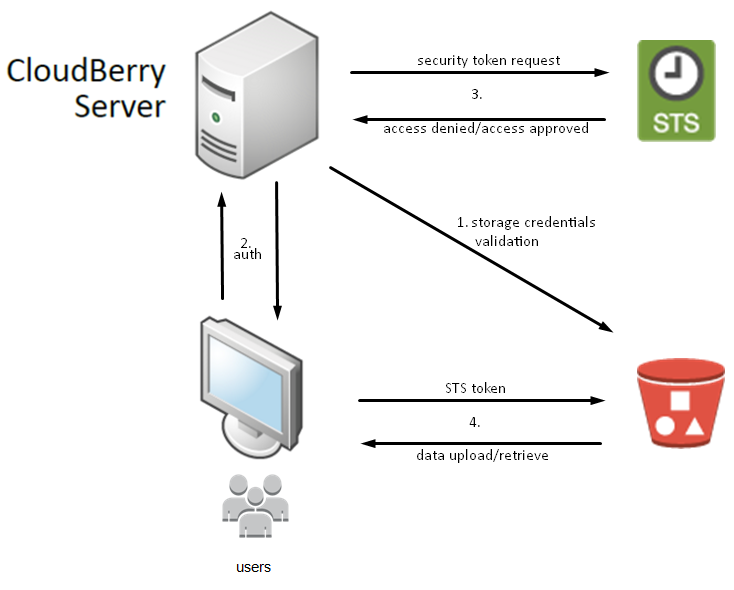
With MSP360 (CloudBerry) you can implement different security methods to protect your data and access to the storage. One of them is using IAM users with AWS.
Contact Us
- Tech questions
- Sales questions: sales@msp360.com.