Computers Shown as Offline in the Computers Grid
This article explains common scenarios in which computers appear Offline in the Computers grid and outlines the recommended actions for each case. The following cases are explained:
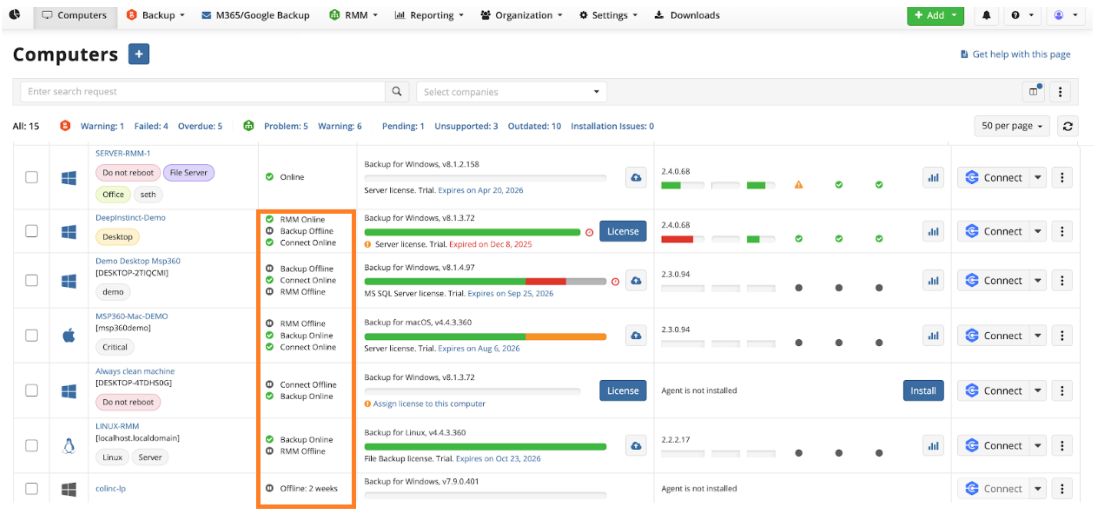
All Agents Offline
A computer appears “Offline” because it is powered off or in sleep mode. However, it may also show as offline due to network issues or other connectivity problems, even if the computer is turned on.
Possible causes:
- The computer is powered off
- The computer is disconnected from the network
- Backup and RMM services are not running
- Antivirus or firewall is blocking the connection
- Temporary communication issues with the Management Console
Recommended Actions
- Allow a few minutes for the status to refresh
- Verify the computer is powered on and has internet access
- Check that Backup and RMM services are running
- Try temporarily disabling antivirus\firewall on this computer to see if it communicates properly
- Open a case for further investigation
Backup Agent Offline
If the Backup Agent status is shown as offline while the other Agents are online.
Recommended Actions
- Allow a few minutes for the status to refresh
- Verify the computer is powered on and has internet access
- Check that Backup services are running. Use Connect Agent to access the affected computer and run Network Diagnostic from the Backup Agent.

- Antivirus or firewall may block the connection. Try temporarily disabling antivirus\firewall on this computer to see if it communicates properly.
- Open a case for further investigation.
RMM Agent Offline
If the RMM Αgent is shown as offline:
Short-Term Offline
Temporary disconnections may occur due to network connectivity issues. This is not typical behavior for the RMM Agent, as it is designed to automatically restart if the service is stopped. Please allow up to 5 minutes for the agent to reconnect.
Long-Term Offline
If the RMM Αgent remains offline for longer than 5 minutes:
- Open a case for further investigation.
Connect Offline
If the Connect only is shown as offline:
- Try restarting Connect service on the endpoint
- Ensure using the latest version of the application
- Antivirus or firewall may block the connection. Try temporarily disabling antivirus\firewall on this computer to see if it communicates properly.
- Open a case for further investigation.